 AI Video Learning Assistant
Turn any video lecture into something you can study from.
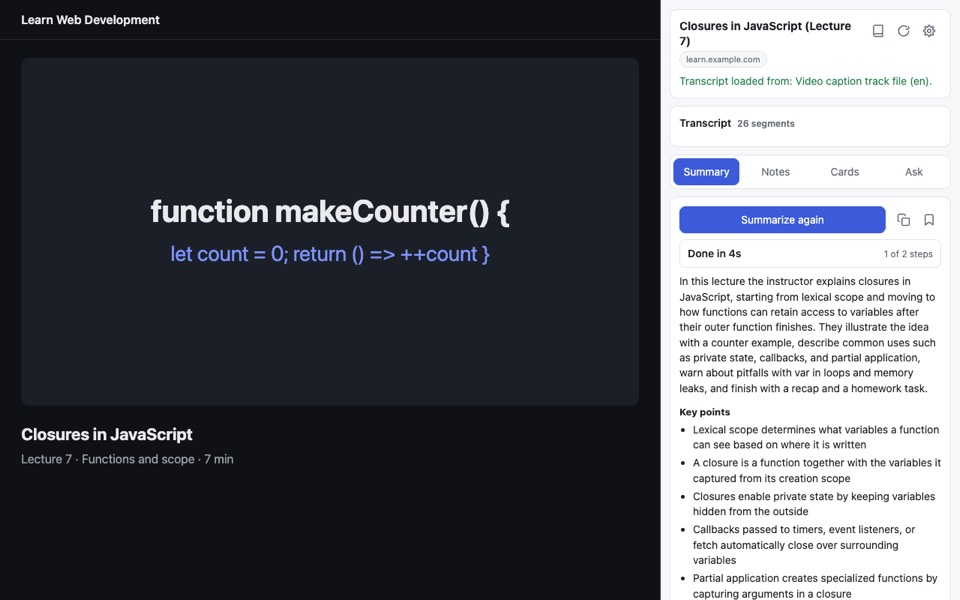
A Chrome side panel that reads the lecture's captions and gives you a summary, study notes, flashcards and answers to your questions, with timestamps that jump the video.
Works on YouTube and most sites that play video with captions.
No copy and paste
Captions load by themselves when you open the panel. No captions? It can transcribe the audio instead.
Summary and timeline
Key points, concepts and sections. Click a time to jump the video there.
Notes and flashcards
Clean study notes and question cards to test yourself. Save, print or download them.
Ask the lecture
Ask a question and get an answer based on what was actually said.
How it works
- Open a lecture video and click the extension icon (or press Ctrl+Shift+Y, Cmd+Shift+Y on Mac).
- The transcript loads from the video's captions.
- Press Summarize, Write study notes, Make flashcards, or ask a question.
Where the AI runs
You choose, and nothing is sent until you press a button. You see each step as it happens and can cancel at any time.
- On your device: uses Chrome's built-in AI where your computer supports it. Free and private.
- Free trial: a limited number of runs through our service, no setup.
- Your own API key: Groq or Google Gemini (both have free plans), OpenAI, OpenRouter, or any OpenAI-compatible service. Best quality. A Groq key also transcribes audio.
Privacy
No account, no ads, no tracking. Your notes and settings stay in your browser. Read the full privacy policy.
Support
Questions or a problem? Contact us through the Support tab of our Chrome Web Store page (link coming soon). In the extension, Settings has a "Copy diagnostics" button. Paste its text into your message to help us fix it faster.